
Accounts payable automation
From “an invoice arrived” to “it posted” with AI doing the reading and finance keeping the controls.
Stream captures every invoice at header and line level, identifies the vendor, predicts GL accounts and dimensions, catches duplicates, matches purchase orders and receipts, routes configurable approvals and posts validated invoices to your ERP, with a complete history on every one.
Deeply connected to the ERPs finance teams run
Capabilities, shown
Each capability, with the screen where it happens
Stream's strengths are easier to see than to list. Every major AP capability below has a screenshot and the business value it delivers.
Capture
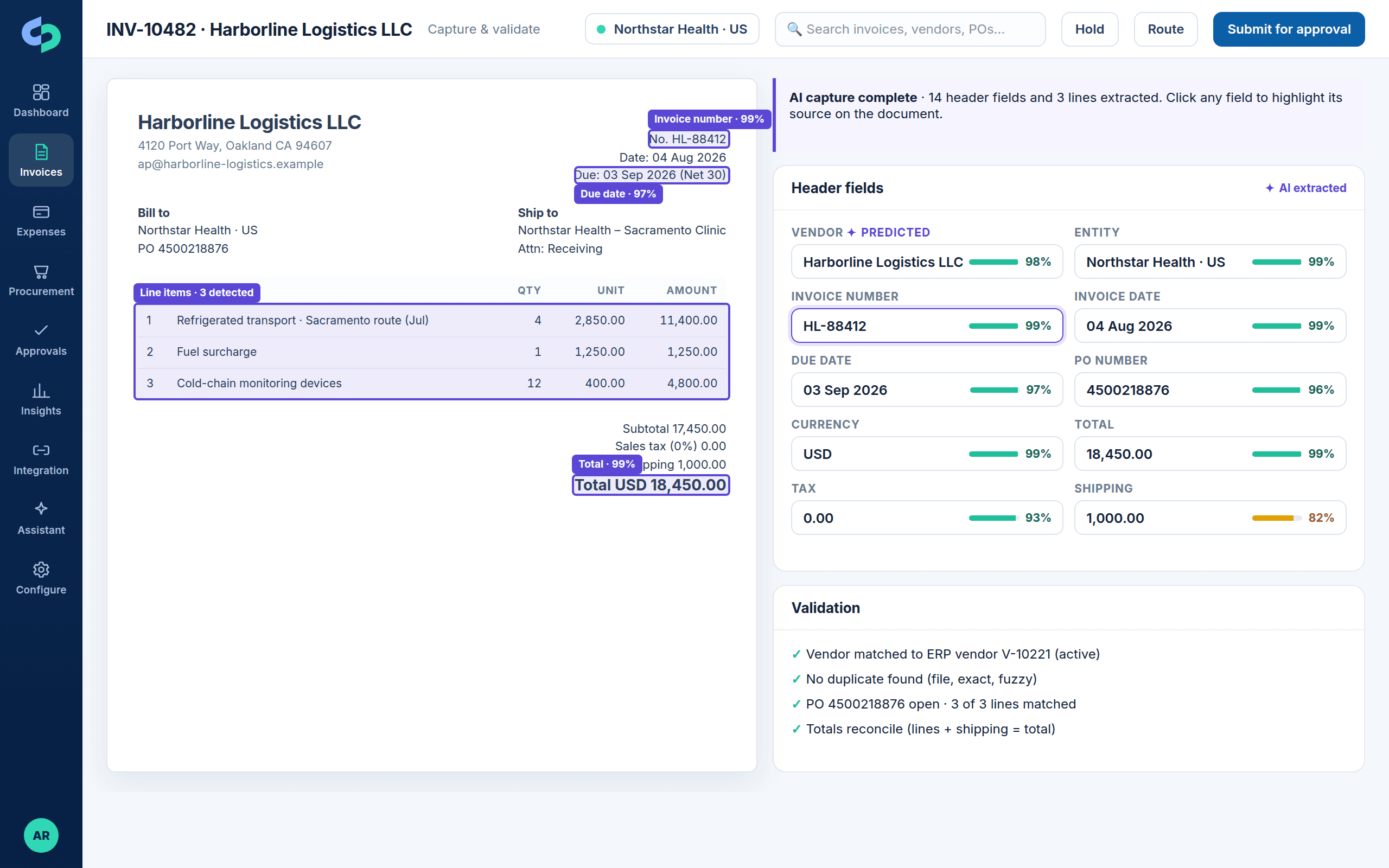
AI-powered invoice capture at header and line level
Invoices arrive from mailboxes, uploads, vendor portals and scans in any format, language or currency. Stream extracts the header and every line, assigns a confidence to each field and highlights on the document where the value came from when you click it.
- Vendor identification and prediction against ERP vendor records
- Multi-currency and multilingual invoices
- Low-confidence fields flagged for a human, everything else moves on
Code
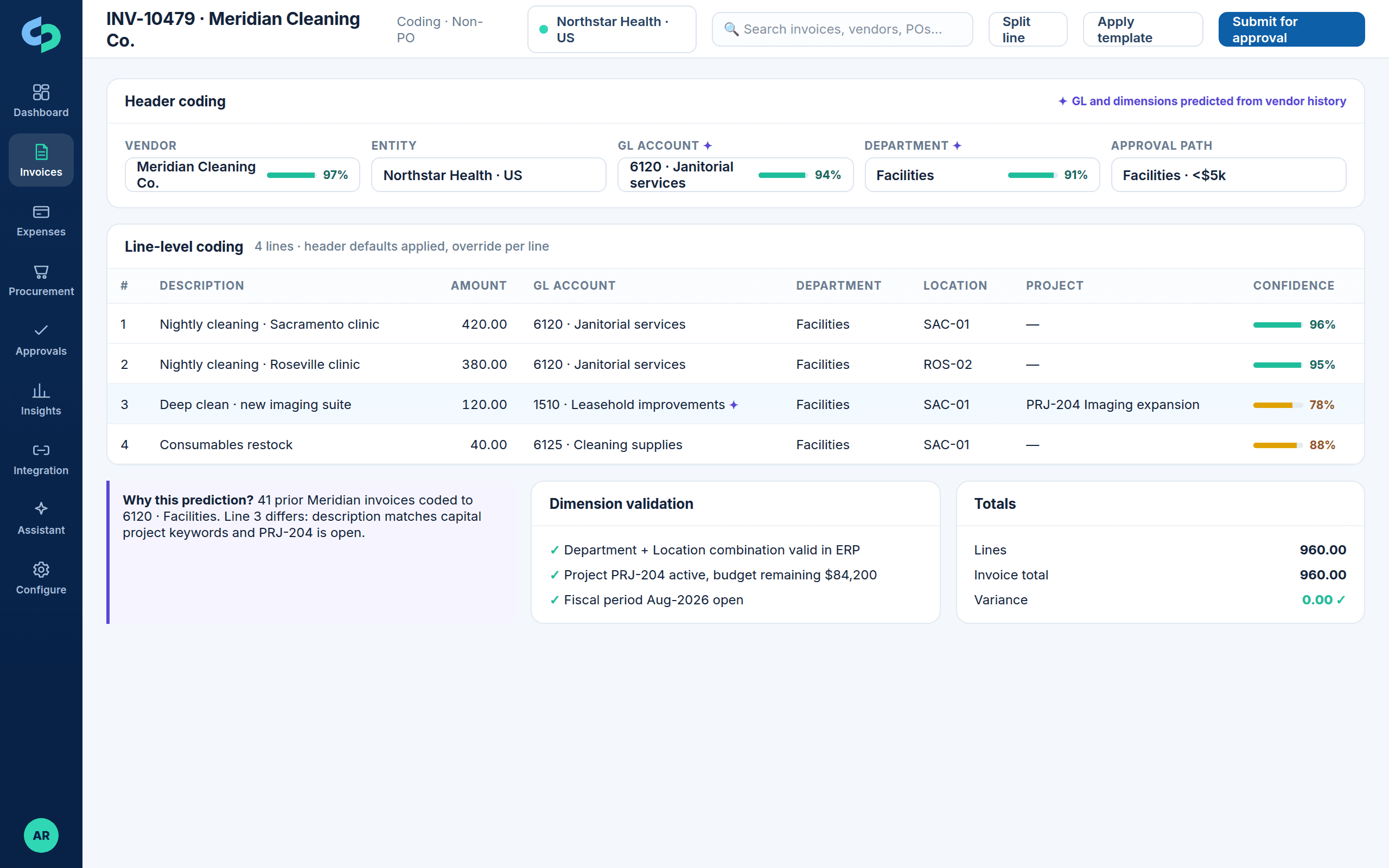
AI-driven GL account and financial-dimension prediction
Header defaults and line-level overrides, predicted from your history and validated as real ERP combinations before anyone approves. Stream explains why it predicted an account, and every override teaches it.
- Header- and line-level coding
- Department, location, project, cost center and custom dimensions
- Validation against the ERP: combinations, periods, budgets
Protect
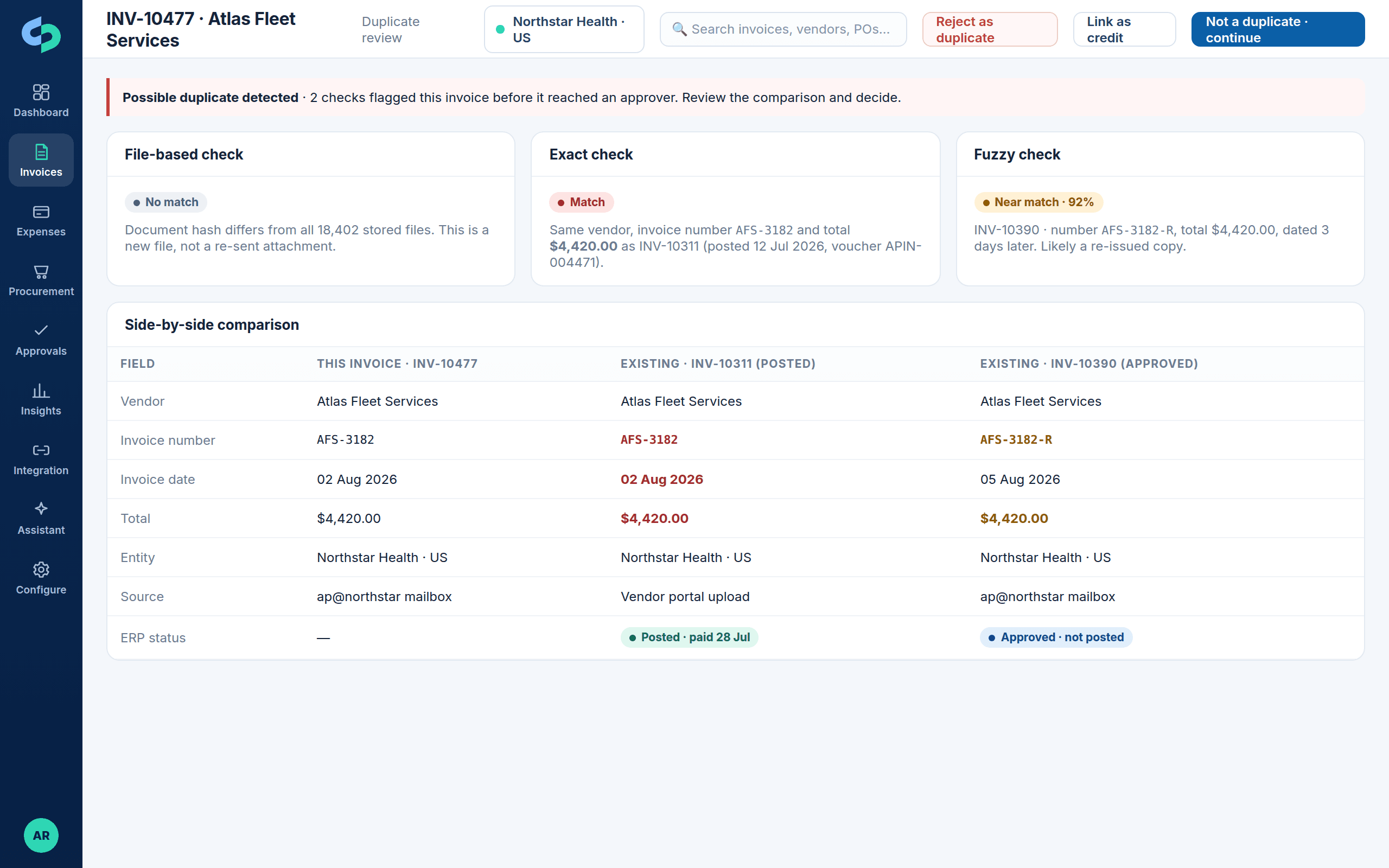
File-based, exact and fuzzy duplicate-invoice detection
Three independent checks run before an invoice reaches an approver. Reviewers see the candidates side by side with ERP posting and payment status, then reject, link as a credit or continue with a reason on record.
- Catches re-sent files, re-issued numbers and near matches
- Runs across entities and history
- Decision and reason recorded in the audit trail
Match
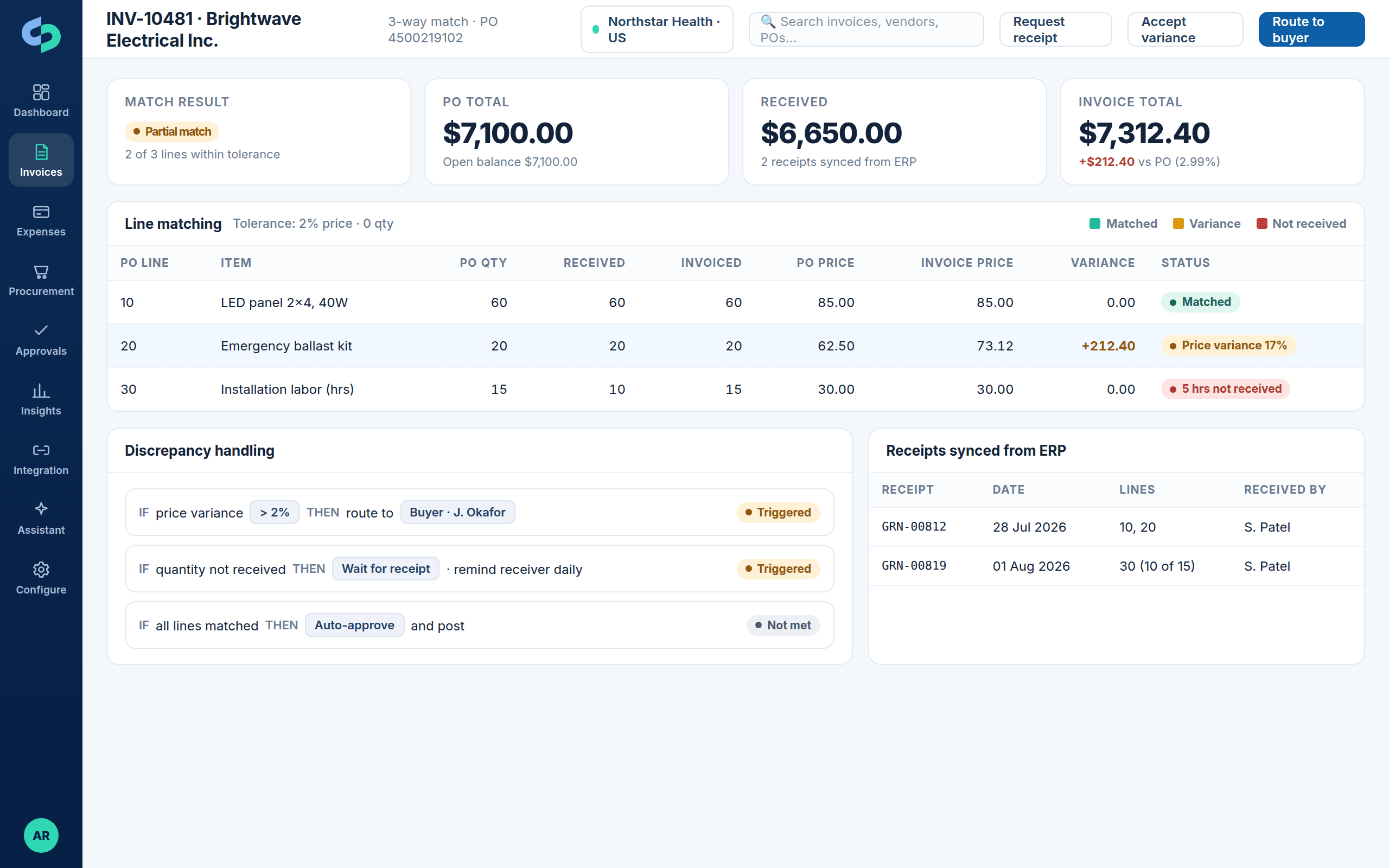
PO and non-PO processing with two-way and three-way matching
PO invoices match to purchase orders and receipts synced from the ERP, line by line, with price and quantity tolerances. Variances are explained and routed to the buyer; missing receipts wait and remind the receiver. Non-PO invoices take the coding path.
- Partial receipts, amendments and blanket POs
- Configurable tolerance and discrepancy rules
- Auto-approval when everything matches
Approve
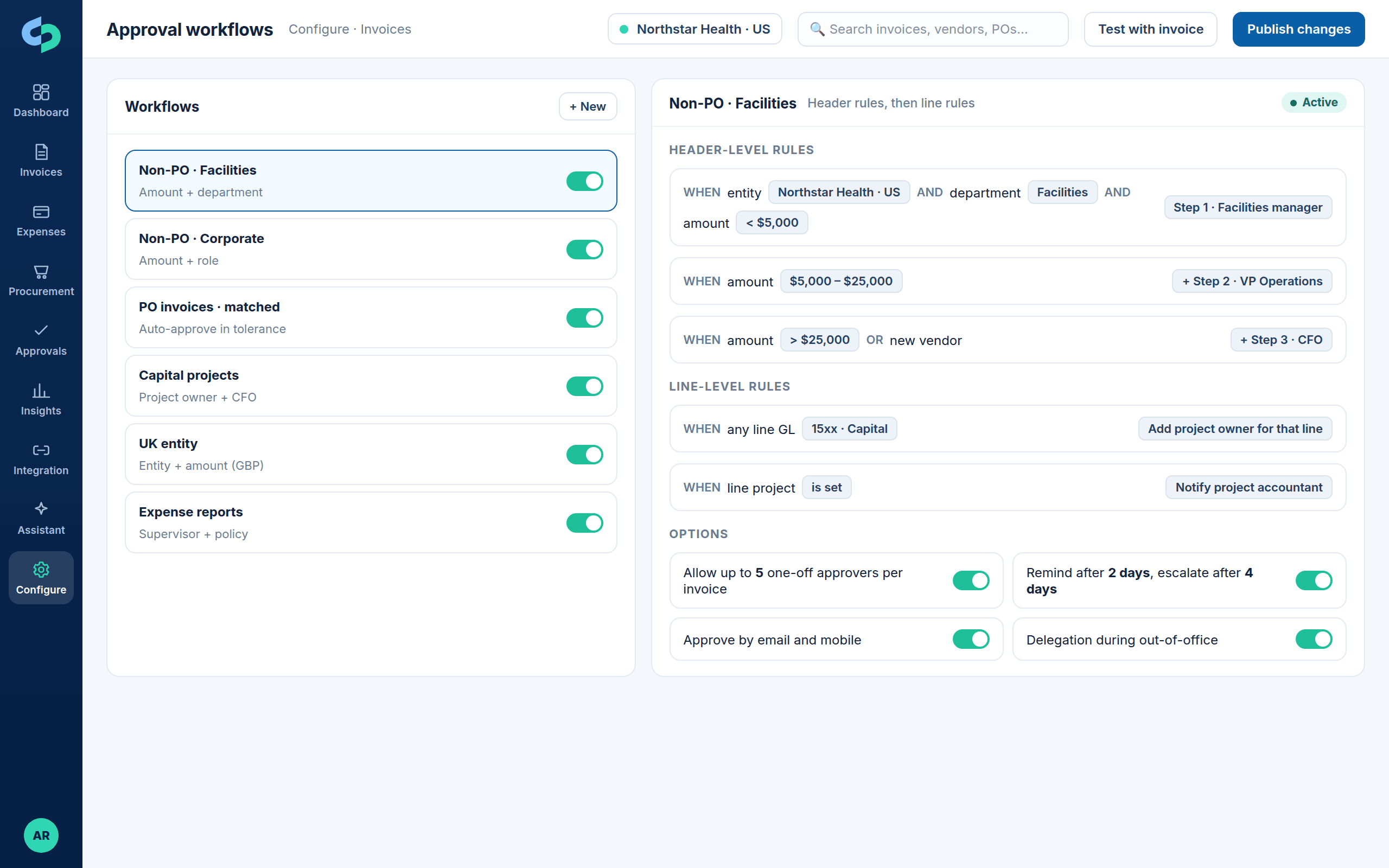
Complex, configurable approvals at header and line level
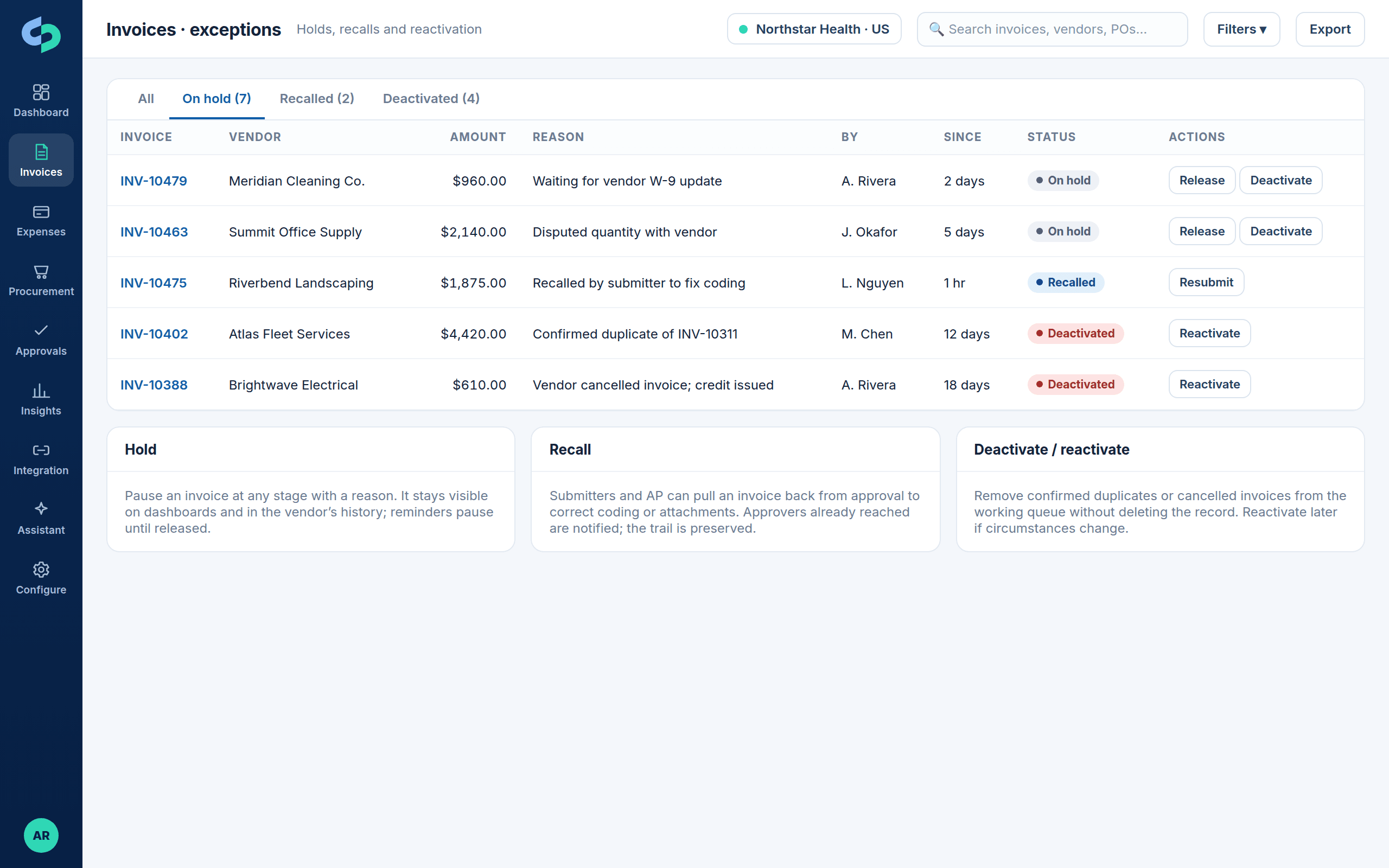
Route by amount, department, entity, project, role, vendor status or any line attribute. Add up to five one-off approvers, delegate during absence, hold, recall, deactivate and reactivate. Reminders and escalation keep the cycle moving.
- Header- and line-level rules in one workflow
- Email digests, mobile and desktop approval
- Every action recorded with identity and timestamp
Post
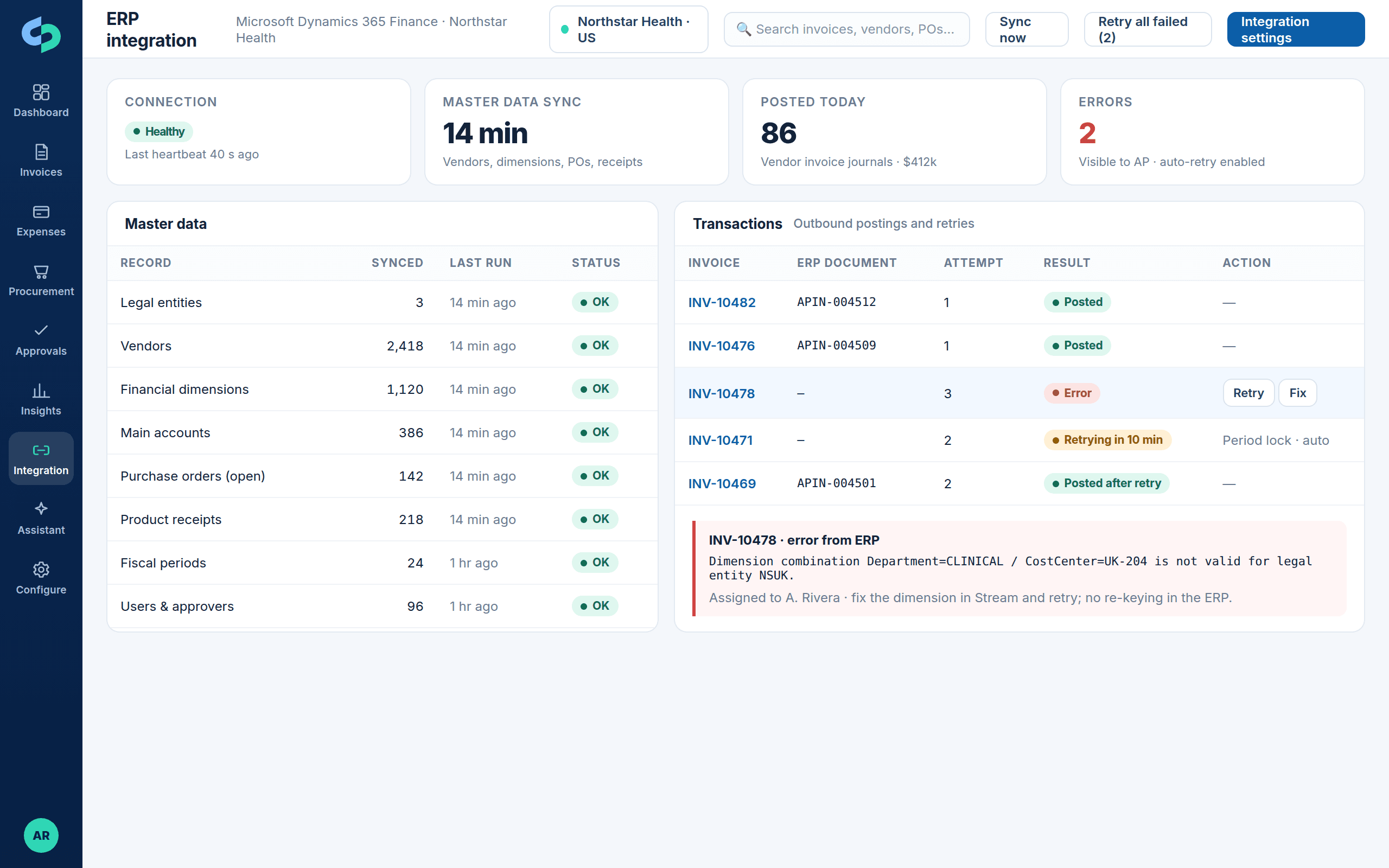
ERP master-data synchronization, posting, retries and visible error resolution
Entities, vendors, dimensions, accounts, POs, receipts and periods synchronize in; approved invoices post out with attachments and approval status. When the ERP rejects a posting, the reason shows in Stream, the fix happens in Stream and the retry is logged.
- D365 Finance & Operations, Business Central, NetSuite, Sage Intacct, QuickBooks, COINS
- Vouchers and payment status flow back
- No re-keying in the ERP
See
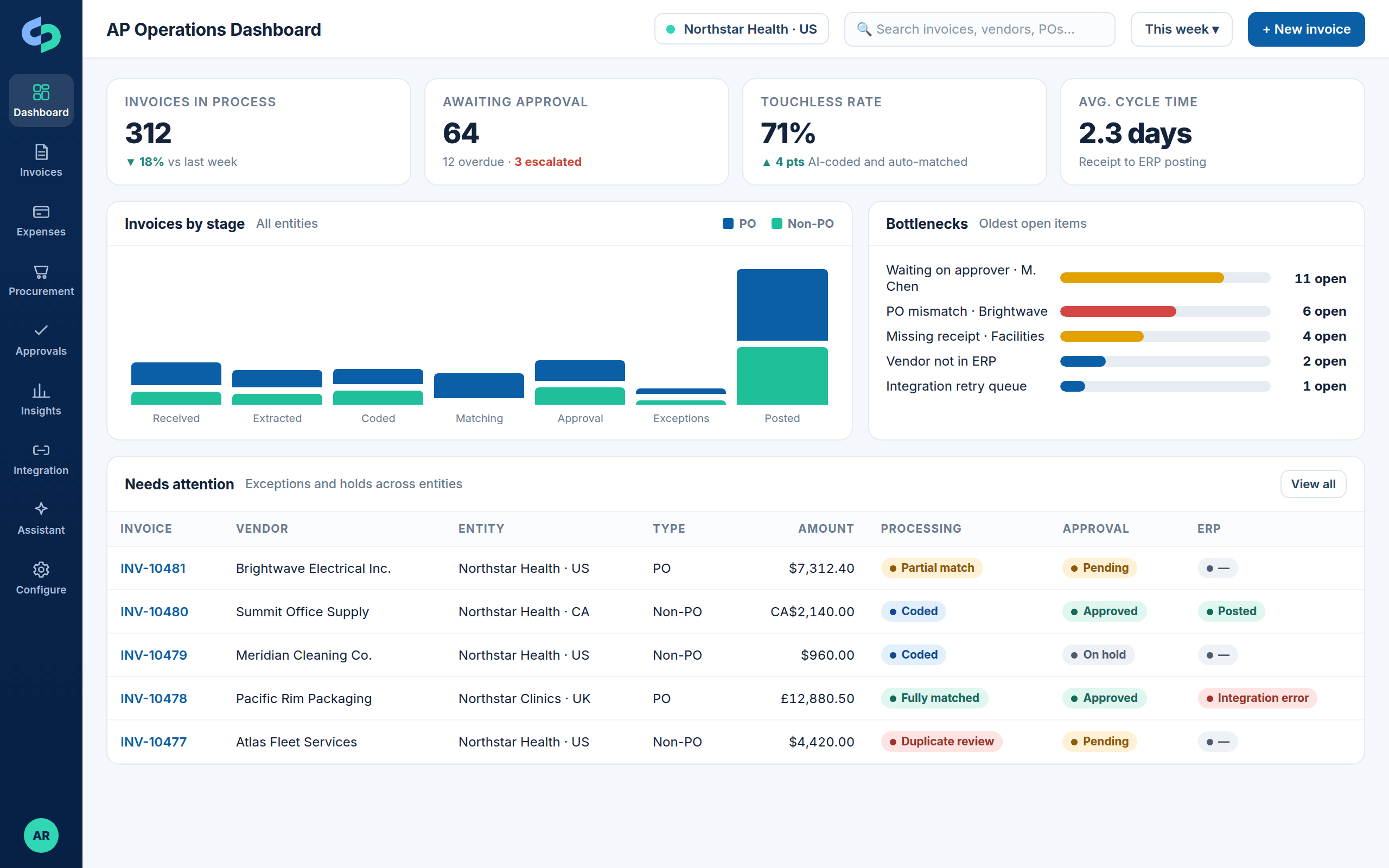
Real-time status, operational dashboards and bottleneck reporting
Every invoice shows processing, approval, integration and payment status. Dashboards show where work is stuck and who owns it; analytics show cycle time by stage and by approver, touchless rate and volume by month.
- Invoice and integration status in real time
- Bottleneck and aging views
- Exportable, scheduled reports
Audit
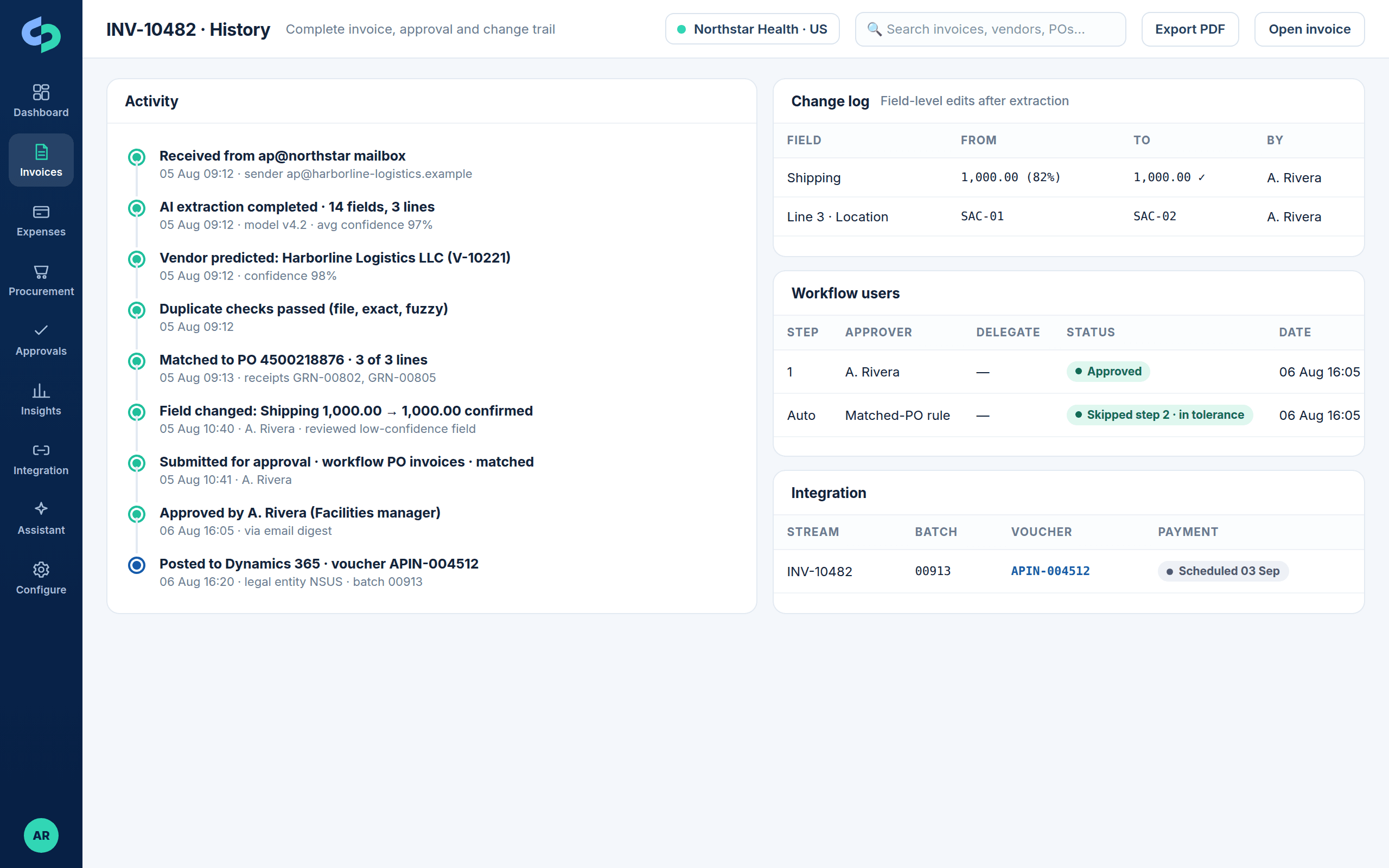
Complete invoice, approval and change history
From receipt to payment, every extraction, field change, approval, hold, recall, retry and posting is recorded with who, when and the before-and-after values. Export per invoice or for an audit period.
- Field-level change log
- Workflow users, delegates and one-off approvers
- Integration references: batch, voucher, payment
Also in AP
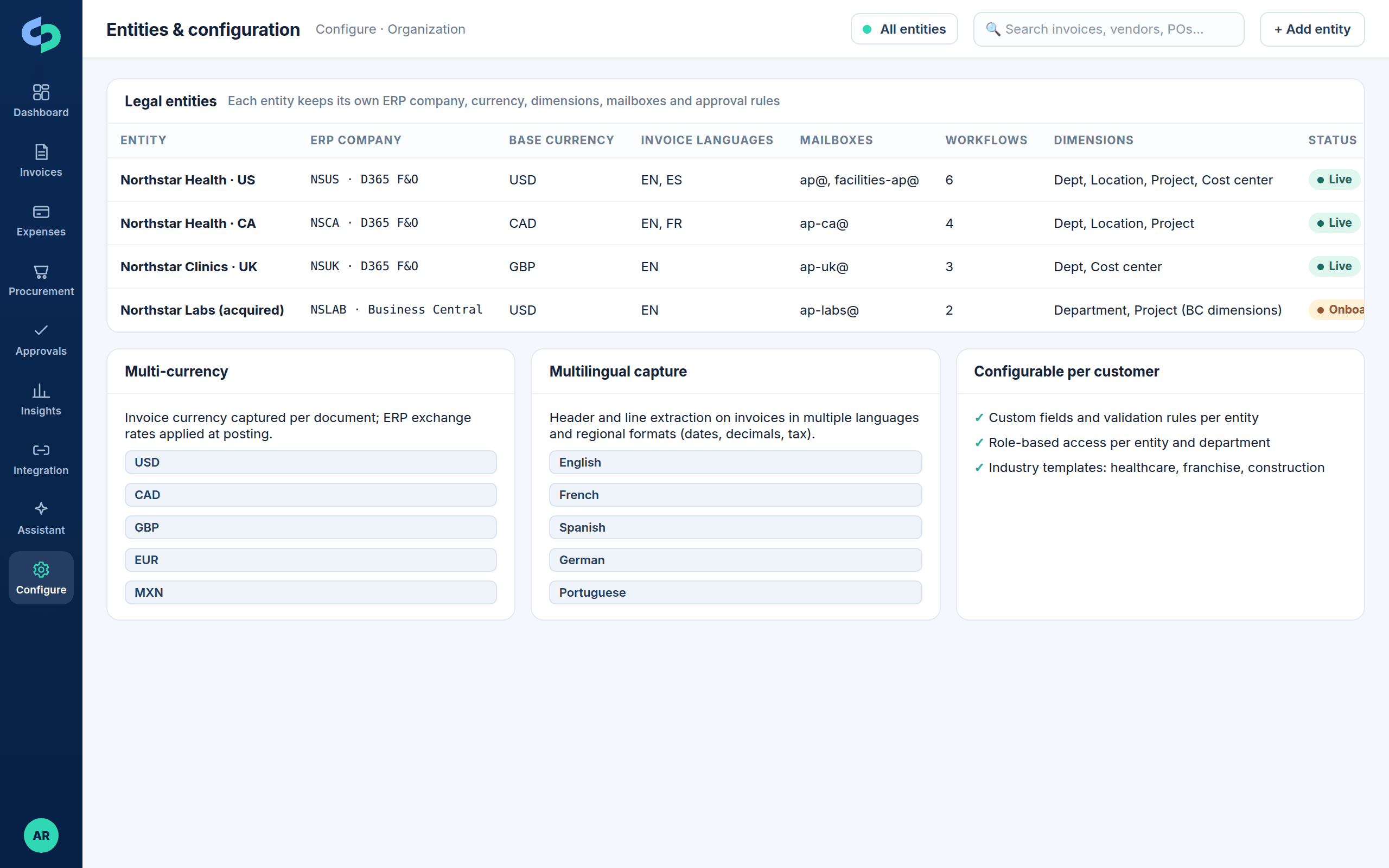
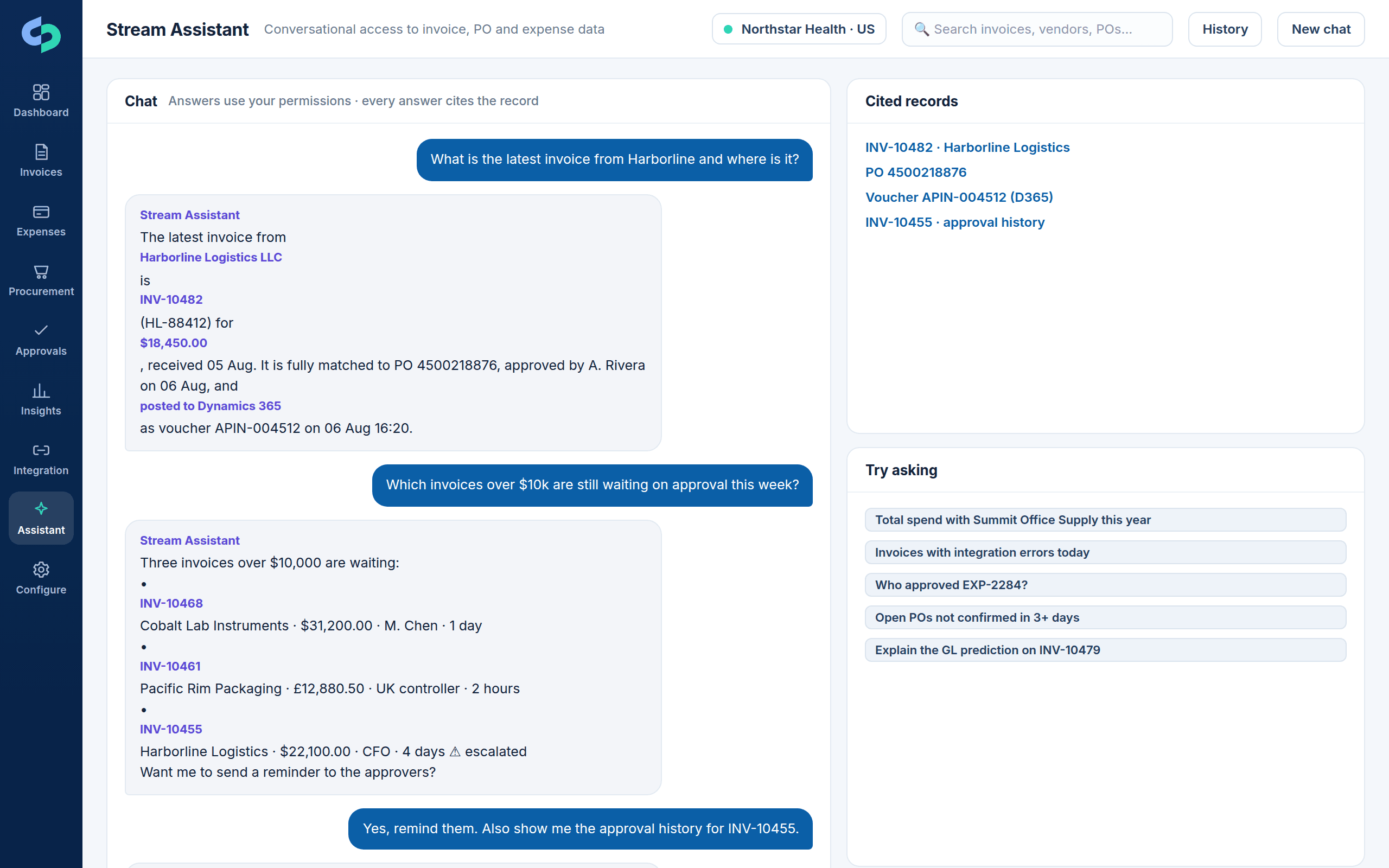
Holds, recalls and reactivation, multi-entity operation, and answers on demand
Questions
AP automation FAQs
Does Stream handle both PO and non-PO invoices?
Yes. PO invoices match to purchase orders and receipts synced from the ERP (2-way or 3-way, with tolerances). Non-PO invoices are coded to GL accounts and dimensions with AI prediction and routed by configurable approval rules. Both run through the same queue, dashboards and audit history.
How accurate is the AI capture?
Every extracted field carries a confidence score and can be clicked to show its source on the document. Fields below your threshold are flagged for review. Vendor identification and GL prediction improve with your history; documented customers reached 76% to 96% vendor identification automation and 70% to 77% GL mapping automation.
What kinds of duplicates are detected?
Three checks run before approval: file-based (the same document again), exact (vendor, invoice number, amount) and fuzzy (near-identical numbers, re-issued copies, amount and date proximity). Reviewers see a side-by-side comparison and can reject, link as a credit or continue.
Can approvals be routed at line level?
Yes. Rules apply at header level (amount, department, entity, project, role, vendor status) and line level (for example, any capital line adds the project owner). Up to five one-off approvers can be added per invoice, and holds, recalls, delegation, reminders and escalation are configurable.
Does Stream support multiple entities, currencies and languages?
Yes. Each entity has its own ERP company, currency, mailboxes, dimensions and approval rules. Invoices in multiple languages and regional formats are captured, and ERP exchange rates apply at posting.
What happens when the ERP rejects a posting?
The ERP's message appears in Stream on the invoice and the integration dashboard, is assigned to an owner, corrected in Stream and retried. Nothing is re-keyed in the ERP and the history records every attempt.
Next step
Bring us your difficult invoice
Send three of your hardest invoices before the demo: multi-page, multi-currency, handwritten notes, a PO with partial receipts. We will process them live against a workflow that resembles yours.