
AP · Expense · Procurement · ERP integration
AI-powered AP, Expense and Procurement automation—deeply connected to your ERP.
Stream captures invoices and receipts, automates coding and policy checks, manages complex approvals, resolves exceptions and sends validated transactions to Dynamics 365 Finance & Operations, Business Central, NetSuite, Sage Intacct, QuickBooks and COINS.
Header and line-level AI capture2-way and 3-way matchingMulti-entity, multi-currency45-day go-live guarantee
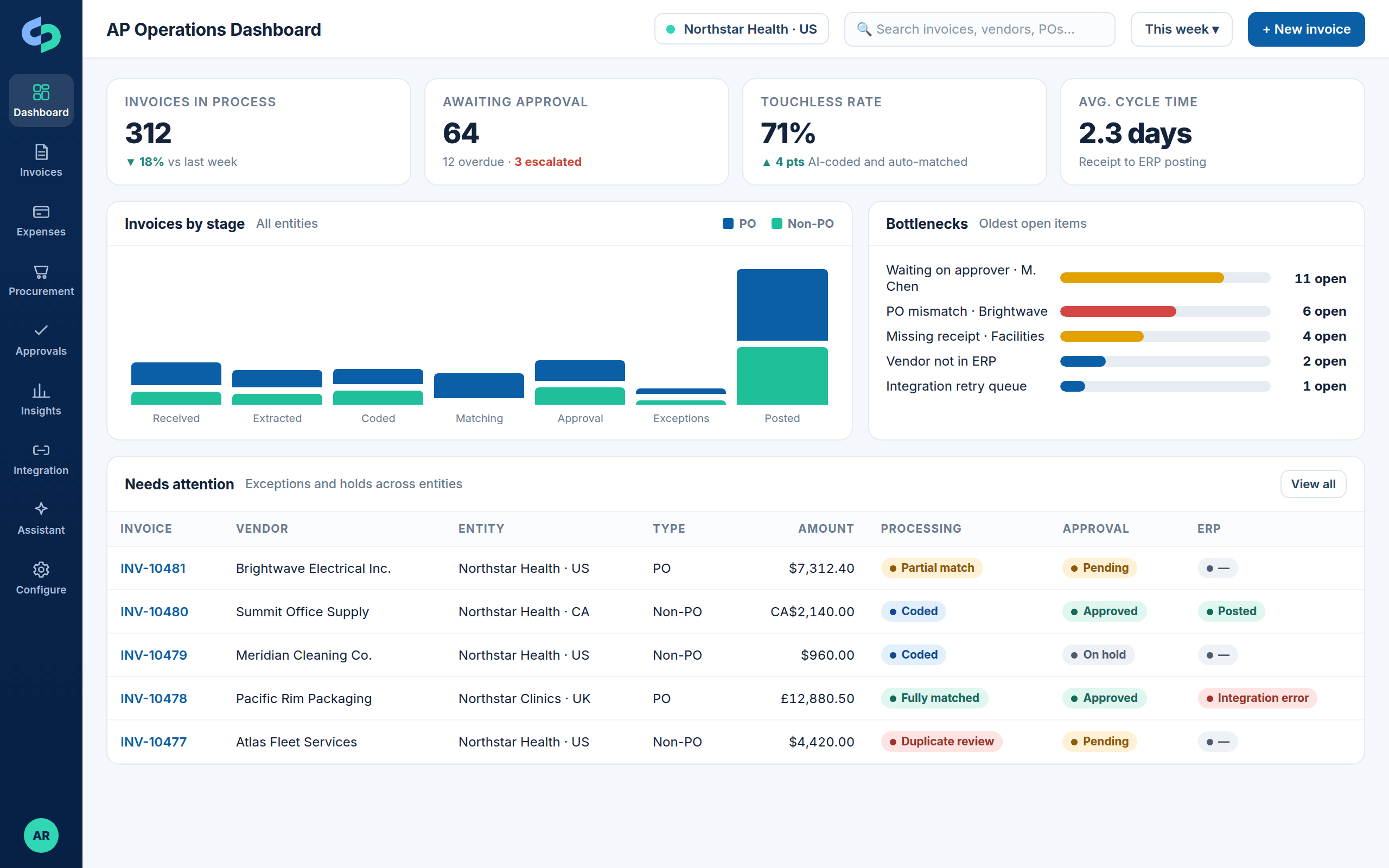
71% touchlessAI-coded, auto-matched and approved without a manual edit
Posted to ERP in 2.3 daysAverage receipt-to-posting cycle time across Stream customers
Deeply connected to the ERPs finance teams run
One platform
Everything between “an invoice arrived” and “it posted to the ERP”
Stream is not an invoice extraction tool. It is a configurable, ERP-connected platform covering accounts payable, expense management and procurement, with AI where it saves work and controls where finance needs them.
AP Automation
AI capture at header and line level, vendor and GL prediction, duplicate detection, PO and non-PO matching, configurable approvals and ERP posting.
- Field-level confidence and source highlighting
- 2-way and 3-way matching
- Holds, recalls and full audit history
Expense Management
Receipt capture, AI extraction, personal-expense exclusion, policy validation, category and GL coding, supervisor and department approvals, ERP posting.
- Policy exceptions explained
- Mobile and email approval
- Combined invoice and expense digests
Procurement
Purchase requests and requisitions, configurable approvals, PO creation in the ERP, confirmation and amendments, receipts and invoice matching.
- Item, category, service and non-inventory
- Partial and full receipts
- Connected PR, PO, receipt and invoice history
ERP Integration
Master-data synchronization and validation, posting with attachments and approval status, retries and visible error resolution for D365 F&O, Business Central, NetSuite, Sage Intacct, QuickBooks and COINS.
- Entities, vendors, dimensions, POs, receipts
- Errors fixed in Stream, not re-keyed
- Vouchers and payment status back in Stream
AI and Stream Assistant
Extraction, vendor identification and coding prediction that improve with history, plus a conversational assistant for questions about any invoice, PO, expense or approval.
- Explainable predictions
- Answers cite the record
- Scoped to user permissions
Analytics and visibility
Real-time invoice and integration status, operational dashboards, bottleneck and processing-time reporting by stage and approver.
- Cycle time by stage
- Approver performance
- Exception and aging views
How Stream works
Follow an invoice, an expense and a purchase order through Stream
An interactive walk through the product. Click any step to see the screen and what happens there.
Step 1 of 7
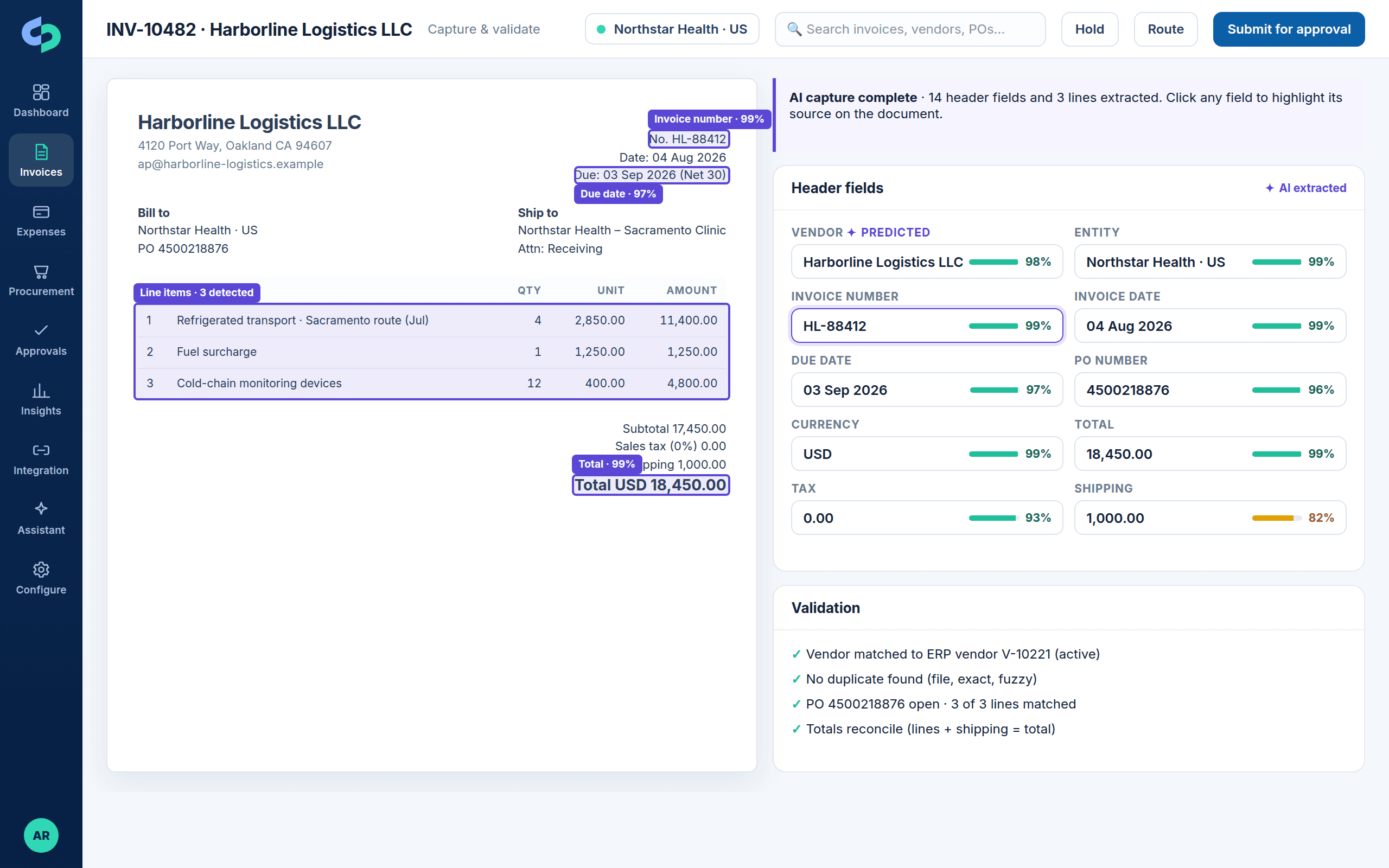
Invoices and receipts arrive; AI reads header and lines
Email mailboxes, uploads, vendor portals and mobile receipts feed one queue. Stream extracts vendor, dates, totals, tax, PO and every line with field-level confidence, and highlights where each value came from.
- Multi-format, multi-language, multi-currency
- Vendor identification and prediction
- Duplicate checks: file, exact and fuzzy
Before and after
What changes for the AP team, the approvers and the controller
The same invoice, with and without Stream.
StepBefore StreamWith Stream
Intake
Invoices arrive in shared inboxes and get forwarded, printed or re-keyed.
Mailboxes, uploads and portals feed one queue; every document is captured and tracked from minute one.
Coding
AP looks up the vendor, guesses the account, asks the department.
Vendor identified and GL and dimensions predicted from history, validated against the ERP, overridable per line.
Matching
PO numbers checked by hand; receipts chased by email.
2-way and 3-way matching with tolerances; receipts sync from the ERP; variances route to the buyer.
Approvals
PDFs emailed around; nobody knows who has it.
Rules by amount, department, entity, project and role; approve from email, phone or desktop; reminders and escalation.
Exceptions
Duplicates found after payment; errors discovered in the ERP.
Duplicates caught before approval; ERP errors surfaced in Stream, assigned and fixed without re-keying.
Visibility
“Where is my invoice?” means a call to AP.
Real-time status on every item, dashboards, bottleneck reporting and Stream Assistant for plain-language questions.
Why Stream
What makes Stream different
Finance teams evaluate Stream alongside capture tools, ERP-native workflow and larger AP suites. These are the reasons they choose it.
ERP depth
Built and supported by the team that implements Dynamics 365, Business Central and NetSuite. Integrations are designed around your entities, dimensions and posting rules, not a generic connector.
Configurable, not rigid
Header- and line-level approval rules, tolerances, custom fields, validation and industry templates are configured per customer and per entity.
One platform
AP, Expense and Procurement share vendors, dimensions, approvals, dashboards and one audit history. Start with AP and switch on the rest.
Exceptions you can see
Duplicates, mismatches, holds, recalls and integration errors are visible, owned and resolved in Stream with a complete trail.
Proof
Measured outcomes from Stream customers
Customer names are withheld by agreement. The operating challenges, solution design and recorded outcomes are described as they occurred, with the ERP named in each case.
MedSpa and salons · Microsoft Dynamics 365
AI-first invoice automation supports rapid multi-location growth
An anonymized MedSpa organization used Stream and Dynamics 365 integration to scale invoice operations from 40+ to 300+ locations while increasing vendor and GL automation.
- 40+ to 300+ locations
- 76% vendor identification automation
- 70% GL mapping automation
Health and fitness · Microsoft Dynamics 365
A growing franchise processes more invoices without proportional staffing growth
An anonymized fitness business modernized AP with Stream, Dynamics 365, Power BI, and connected data workflows.
- 600 invoices per week
- 96% vendor identification automation
- 77% GL mapping automation
“Skalable Stream cuts down typing out and emailing invoices. It processes the PDF copy automatically and provides clear reporting so we know the status of all received invoices. We get more done, more accurately, with fewer people.”
 Clint WeilerCFO
“Stream provides AI assistance in converting invoices and a complete paper trail and approval audit trail. Invoice submitters can answer ‘where is my invoice?’ without waiting for AP to find it.”
 Bob SIT Strategy & Implementation Consultant
“Definite recommendation—it makes it easy to approve and track invoices.”
 Jonathan ADirector of Operations
See it
Stream in 90 seconds
A short walk through capture, coding, approval and posting. Prefer to click through yourself? The product tour needs no form.
Trust
Built for finance controls, security and a predictable implementation
SSO and role-based access, complete audit logs, responsible AI and customer-data handling, an implementation methodology with a 45-day go-live guarantee, and a support model that stays engaged after go-live.
Security & Trust
Single sign-on, role-based access per entity, audit logs, encryption, data residency and how AI models use your data.
Read more →Implementation & support
Discovery, configuration, integration, testing, training and cutover in a scoped 45-day plan, then managed support.
Read more →Compare approaches
Manual AP, capture-only tools, ERP-native workflow and Stream, side by side.
Read more →Ways to engage
Choose your next step
Different questions need different conversations. Pick the one that matches where you are.
Next step
See Stream working on your invoices, expenses and purchase orders
Bring a difficult invoice, an approval challenge and your ERP. We will show how Stream is configured around your operating model, not a generic feature tour.