
COINS

Invoice automation for construction finance running on COINS.

Stream captures subcontractor and supplier invoices, codes them to companies, jobs and cost heads, matches to COINS purchase orders and creates purchase ledger invoices with the audit trail construction finance requires.
AP, Expense and ProcurementMaster-data validationVisible error resolution
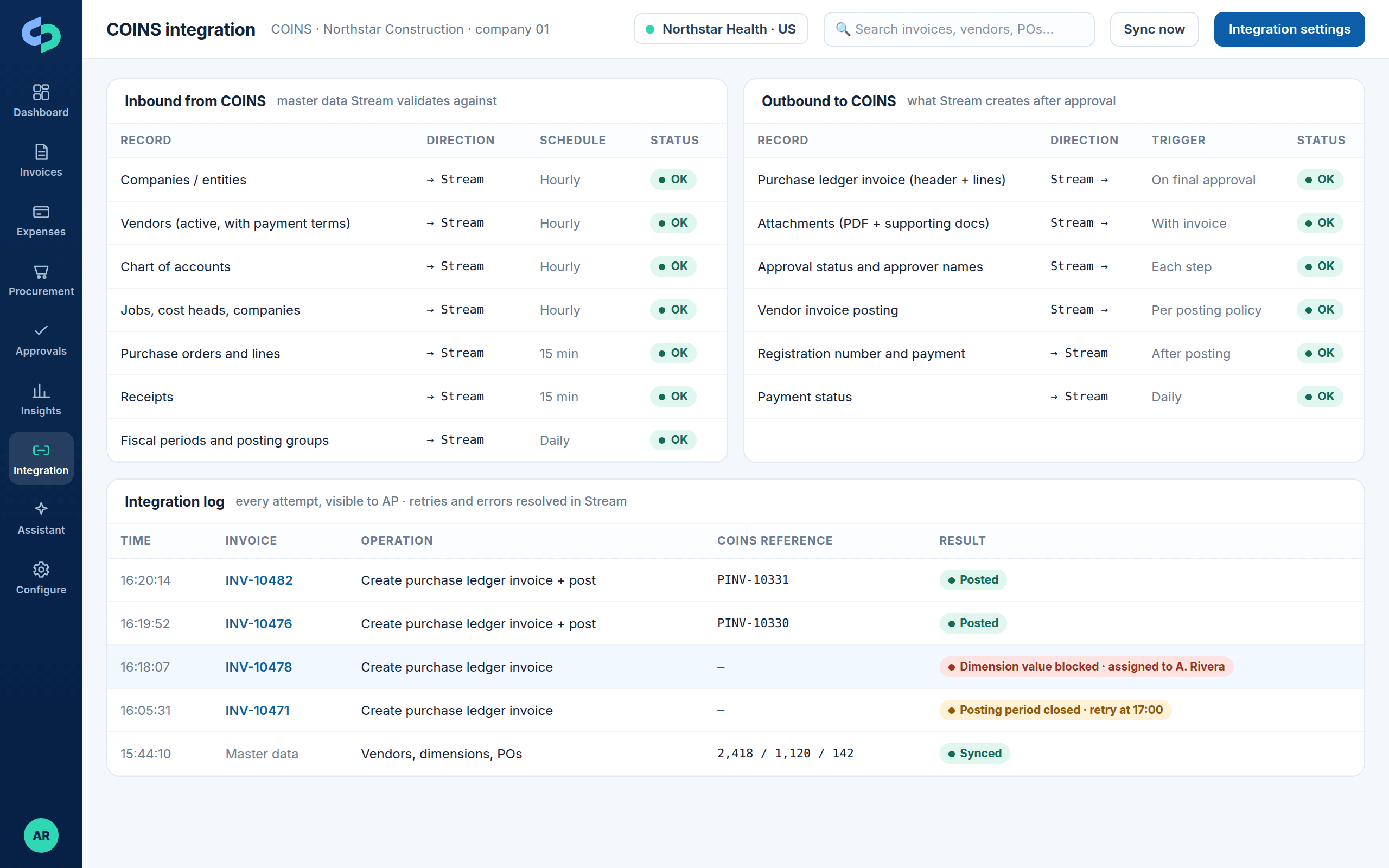
COINS integration map with companies, jobs, cost heads and purchase ledger invoices
Companies, jobs, cost heads and purchase ledger invoices for COINS.

What synchronizes

How Stream and COINS exchange data

Master data flows in so every invoice, expense and purchase order is validated before it posts. Approved transactions flow out with attachments, approval status and posting results.

Inbound from COINS

Companies
Each COINS company maps to a Stream entity.
Suppliers
Supplier records and terms.
Jobs and cost heads
Job costing structure Stream codes against.
Purchase orders
Committed POs for matching.
Receipts / GRNs
Where recorded, for 3-way matching.
Periods
Closed periods respected.

Outbound to COINS

Purchase ledger invoices
Approved invoices registered with job and cost head lines.
Attachments
Source documents attached.
Approval status
Written back for audit.
Registration
Registered on final approval or held for review.
Payment status
Flows back to Stream.

Capabilities

What the COINS integration handles

Sync direction, frequency and posting policy are agreed during discovery and can differ by entity.

Job costing

Coding to job, phase and cost head with validation.

Subcontractor context

Retention and application history where applicable, scoped during discovery.

Integration error handling

COINS validation errors surfaced, assigned and retried.

Multi-company

Company-specific rules from one instance.

Approval workflow

Project manager, quantity surveyor and finance routing.

Audit history

Complete trail per invoice.

Error handling

When the ERP says no, AP fixes it in Stream

Every posting attempt is logged. A rejected posting shows the ERP's own message, is assigned to an owner, corrected in Stream and retried. Nothing is re-keyed in the ERP and the trail is preserved.
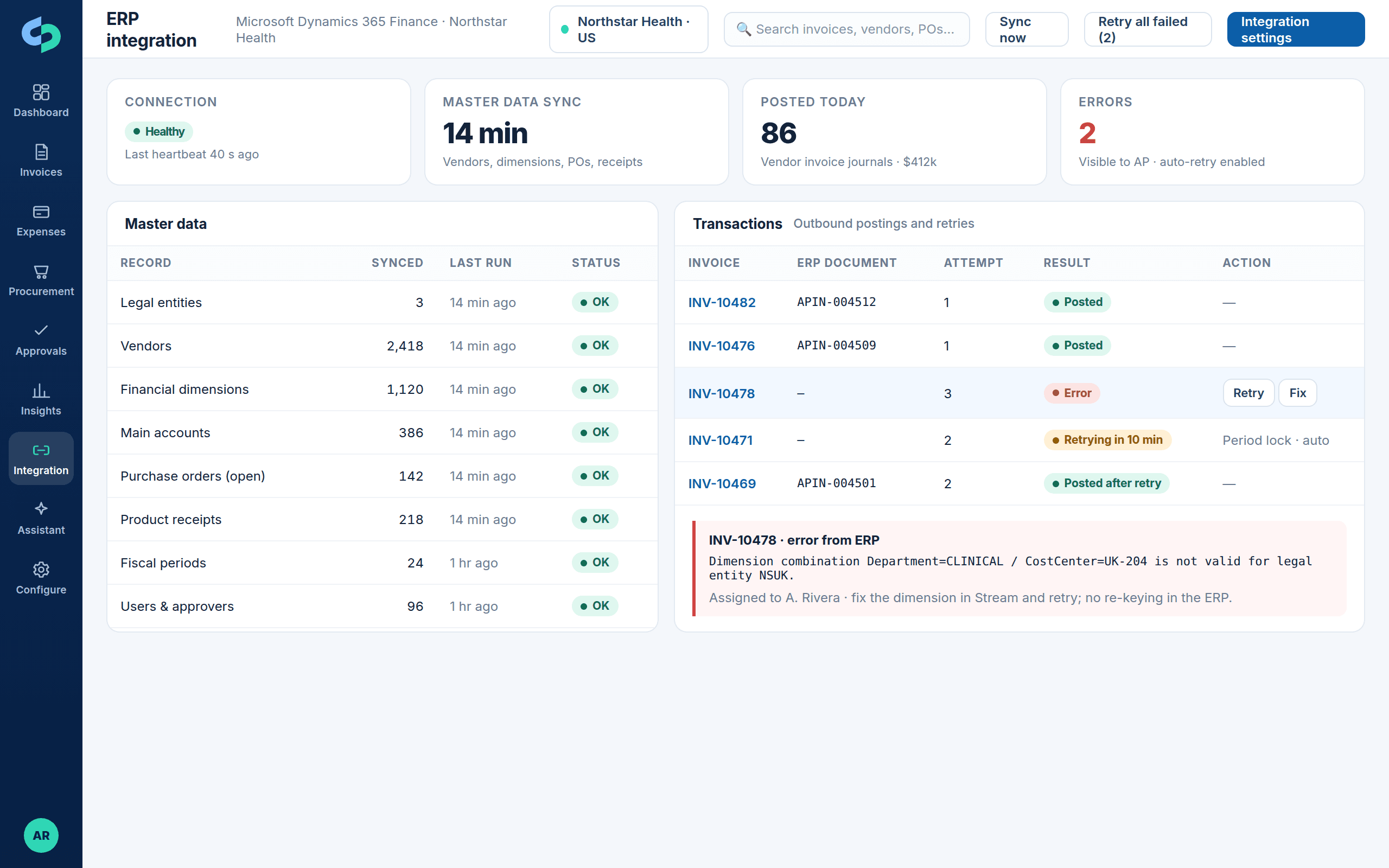
Integration retries and visible resolution

  • Automatic retries for transient conditions such as a period that has just closed
  • Business errors (blocked dimension, missing vendor, invalid combination) assigned to a named owner
  • Fix in Stream, retry, and see the ERP document number come back
  • Integration status on every invoice and on the dashboard
See integration monitoring on the platform page →
ERP integration status with master data sync, postings, retries and an error assigned to an owner
Master data sync, postings and retries, with ERP errors shown in Stream, assigned and resolved without re-keying.

Implementation

Implementing Stream with COINS

Discovery confirms records, fields, direction of sync, validation, posting policy and exception ownership before configuration begins. The 45-day go-live guarantee applies to a scoped implementation.

1Discover records
2Map fields & dimensions
3Define controls
4Build & secure
5Validate scenarios
6Go live & monitor

Questions

COINS integration FAQs

Which COINS versions are supported?

Confirmed during discovery against your COINS version and integration options.

Next step

Evaluate Stream with COINS

Bring your entity structure, dimension model, PO mix and posting policy. We will walk through the integration design and show it on a representative invoice.

Product tourBook a demo