
Integrations

Deep, two-way ERP integration designed by the team that implements the ERP.

Master data flows into Stream so every invoice, expense and purchase order is validated before it posts. Approved transactions flow out with attachments and approval status. Errors come back to Stream where AP fixes them. Sync direction, frequency and posting policy are agreed per entity.
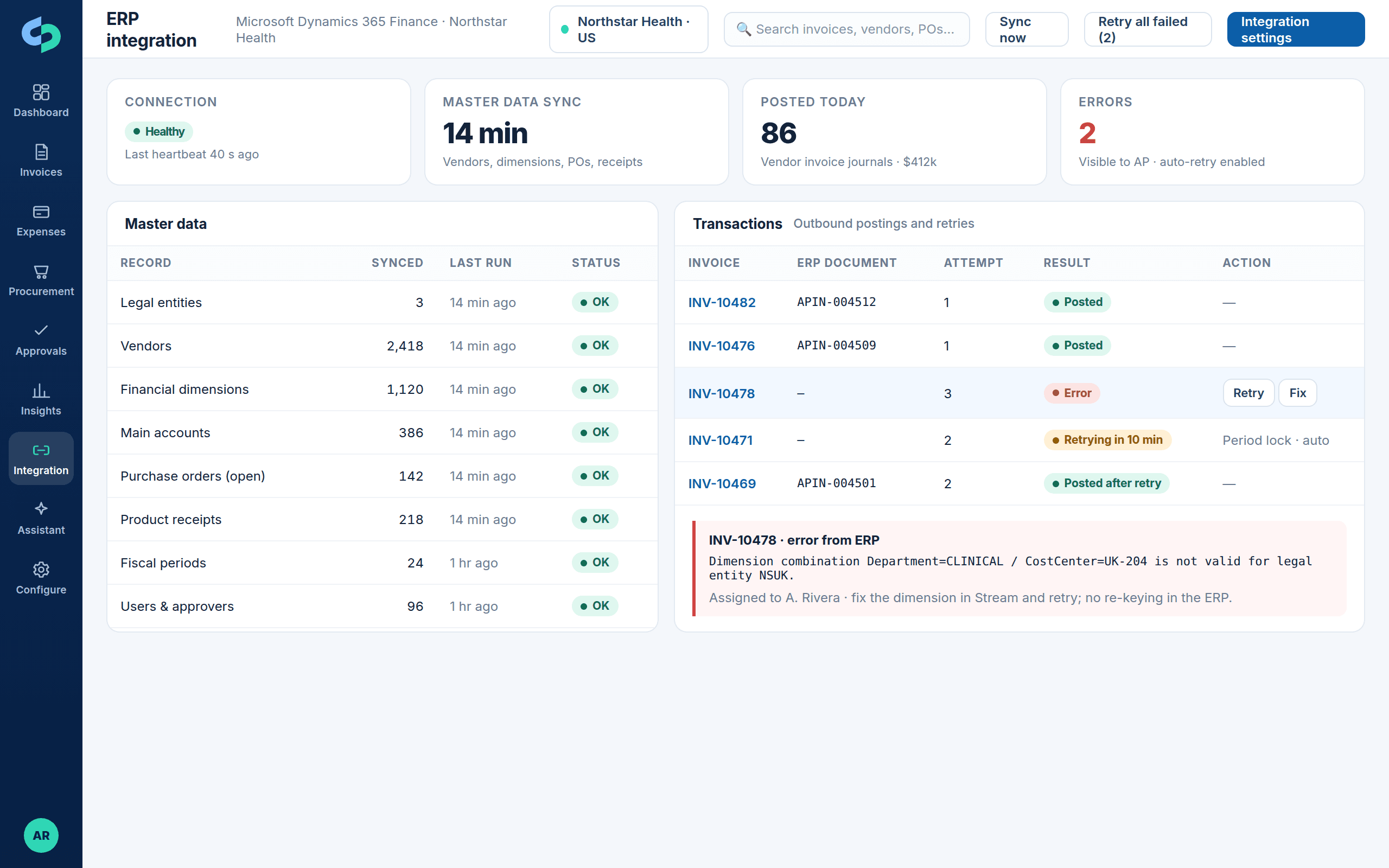
Microsoft Dynamics 365 partner-builtMaster-data validationRetries and visible error resolution
ERP integration status with master data sync, postings, retries and an error assigned to an owner
Master data sync, postings and retries, with ERP errors shown in Stream, assigned and resolved without re-keying.

Supported ERPs

Choose your system of record

Each integration has its own page with the records that synchronize in each direction, the capabilities, error handling and FAQs.

Microsoft Dynamics 365 Finance & Operations

AP, expense and procurement automation aligned to D365 Finance and Supply Chain legal entities, financial dimensions, purchasing and posting.

  • Legal entities and financial dimensions
  • Vendors, POs, product receipts and invoices
  • Vendor invoice journals and pending invoices
  • Workflow status, vouchers and payment state
View the D365 Finance & Operations integration →

Microsoft Dynamics 365 Business Central

Purchase invoice creation, vendor and dimension synchronization, attachments, approval status, posting and integration-error handling for Business Central.

  • Companies, vendors and global dimensions
  • Purchase orders and receipts
  • Purchase invoice creation and posting
  • Approval status, attachments and error handling
View the D365 Business Central integration →

Oracle NetSuite

Vendor bills, purchase orders, item receipts, subsidiaries, classes, departments, locations and custom segments.

  • Subsidiaries and currencies
  • Vendor bills and purchase orders
  • Custom segments and fields
  • Approval routing and posting
View the Oracle NetSuite integration →

Sage Intacct

AP bills, purchasing, entities and dimensions for multi-entity Intacct environments.

  • Entities and dimensions
  • Vendors and bills
  • Purchasing and approvals
  • Validation and posting
View the Sage Intacct integration →

QuickBooks

Invoice capture, coding and approval in front of QuickBooks so bills reach the ledger validated and approved.

  • Companies and classes
  • Vendors and bills
  • Chart of accounts mapping
  • Approval and export controls
View the QuickBooks integration →

COINS

Invoice automation for construction finance with job, cost head, supplier, company and purchasing context.

  • Companies and jobs
  • Suppliers and purchasing
  • Cost heads and coding
  • Exception ownership
View the COINS integration →

Other systems and API

REST APIs, webhooks, identity providers, banks and payment platforms, card feeds, vendor portals, BI and industry applications.

  • REST API and webhooks
  • SAML/OIDC single sign-on
  • Additional ERP connectors on request
See other integrations →

How it works

What every Stream integration does

The pattern is the same across ERPs; the records and posting policy are specific to yours.

Inbound

Master-data synchronization and validation

Entities or companies, vendors, chart of accounts, dimensions or segments, purchase orders, receipts, periods and users synchronize on a schedule. Stream validates coding against real combinations and never posts into a closed period.
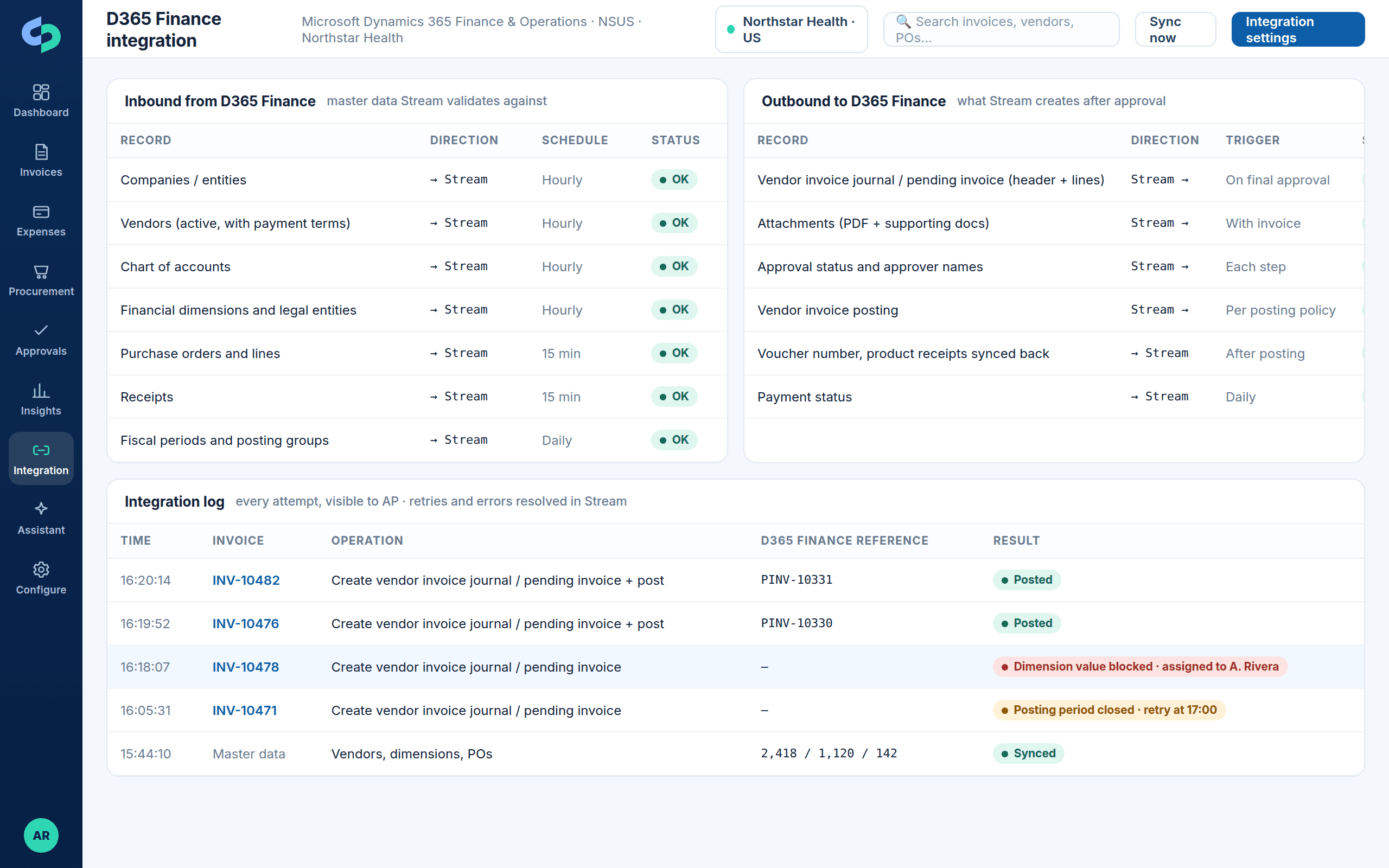
  • Vendors, dimensions, accounts, POs, receipts
  • Combination and period validation before approval
  • Scheduled sync per record type
Dynamics 365 Finance & Operations integration map with legal entities, dimensions, vendor invoices and receipts
Legal entities, financial dimensions, product receipts and vendor invoice posting for D365 Finance & Operations.

Outbound

Posting with attachments, approval status and write-back

Approved invoices, expense reports and purchase orders are created in the ERP with header and line detail, attachments and approval history. Document numbers, vouchers, posting status and payment state flow back so users never need to open the ERP to answer status questions.
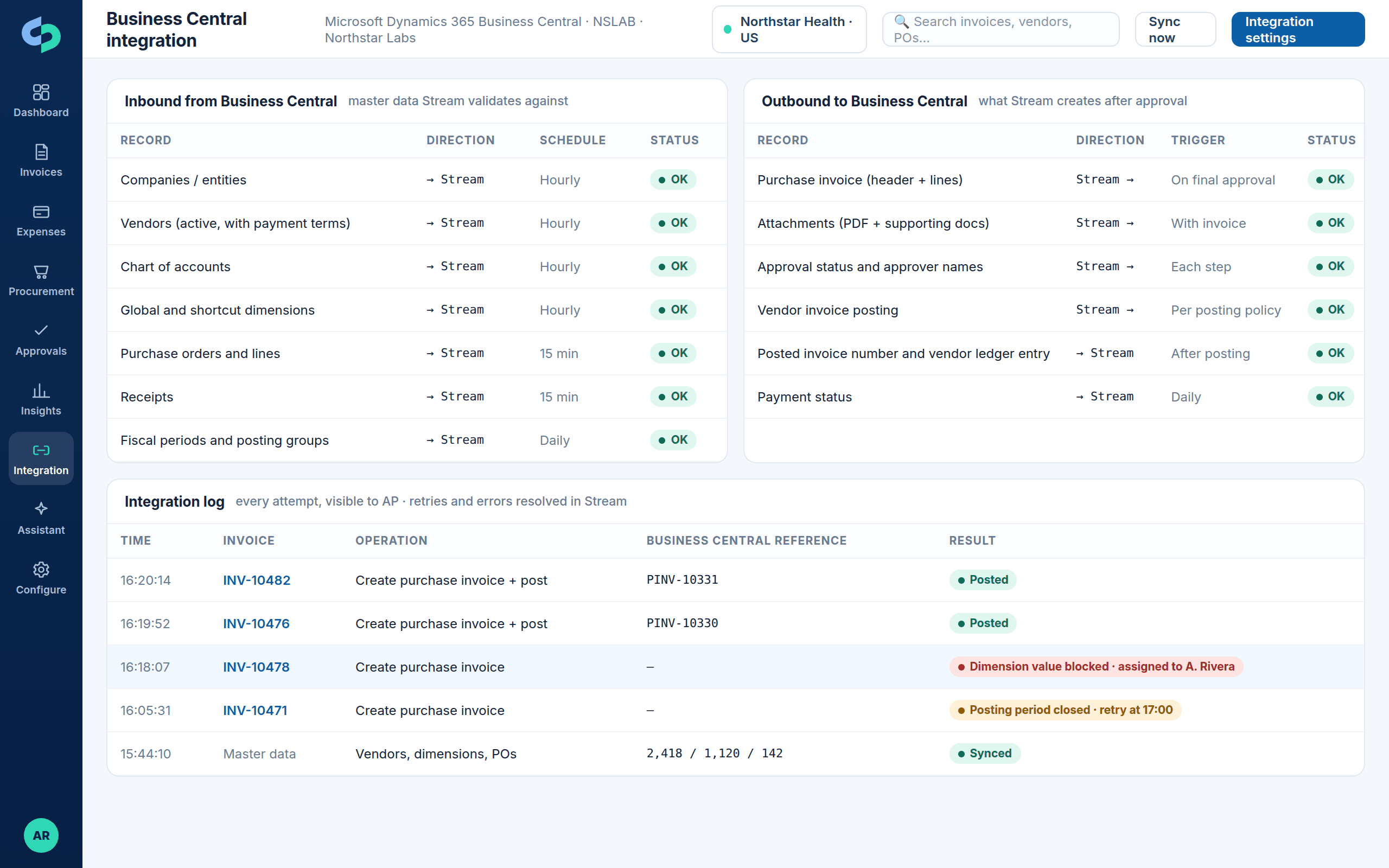
  • Header and line posting
  • Attachments and approver names on the ERP record
  • Vouchers and payment status back in Stream
Business Central integration map with inbound master data, outbound purchase invoices and the integration log
Inbound master data, outbound purchase invoices and a visible integration log for Business Central.

Errors

Integration retries and visible error resolution

Every attempt is logged. Transient issues retry automatically; business errors show the ERP's message, are assigned to an owner, corrected in Stream and retried. Integration status appears on every record and on the dashboard.

  • Automatic retries
  • Owners, reasons and fixes in Stream
  • No re-keying in the ERP
ERP integration status with master data sync, postings, retries and an error assigned to an owner
Master data sync, postings and retries, with ERP errors shown in Stream, assigned and resolved without re-keying.

Beyond the ERP

The rest of the finance ecosystem

Stream participates in a broader integration design where needed.

Banks and payment platforms

Approved, validated payables data prepared for your payment channel.

Expense card feeds

Corporate card transactions matched to receipts in Expense Management.

Vendor portals and e-invoicing

Structured invoices received directly.

Data platforms and BI

Stream data available for Power BI and warehouse reporting.

Identity providers

Microsoft Entra ID, Okta and other SAML/OIDC providers for SSO.

Industry applications

Practice management, property, franchise and project systems scoped per customer.

Next step

Validate your integration design before you buy

Bring your ERP edition, entity structure, dimension model, PO mix and posting policy. We will walk through the integration and show it on a representative invoice.

Product tourBook a demo